Short answer: the presets’ starting values
These are the values AstroStackerPro’s presets start from on iPhone, designed for a phone on a tripod with no tracker. You can change them by hand. On this page “frames” and “photos” mean the same thing: each shot of the session before it is stacked.
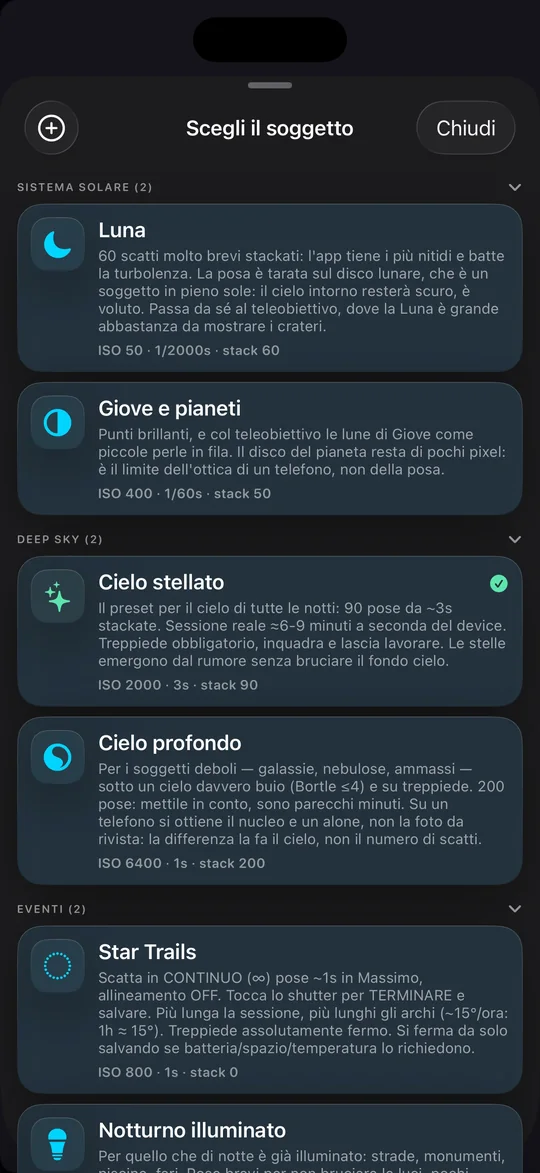
| Preset (subject) | Frames | Exposure | ISO | What happens to the frames |
|---|---|---|---|---|
| Moon | 60 | 1/2000 s | 50 | Keeps the sharpest 30% (18), aligns and averages them |
| Jupiter and planets | 50 | 1/60 s | 400 | Keeps the sharpest 30% (15), aligns and averages them |
| Starry sky (wide field) | 90 | up to 3 s | 2000 | Aligns on the stars, then sigma-clip |
| Deep sky (galaxies, nebulae, clusters) | 200 | 1 s | 6400 | Aligns on the stars, then sigma-clip |
| Star Trails | no limit | about 1 s | 800 | No alignment: keeps the brightest value at each pixel |
| Illuminated night (streets, monuments) | 12 | 1/15 s | 400 | Averages with sigma-clip |
Exposure and ISO are adapted to your phone’s sensor limits. Values may be different on Android: see the questions at the end. The last preset is called “Lit night scene” in the app’s English interface.
Why doubling the frames doesn’t double the result
Stacking means averaging several photos of the same patch of sky. The stars and the nebula are the same in every shot. The noise isn’t: it is random, changes from one photo to the next and, in the average, mostly cancels out.
The math fits in one line. With N frames the noise drops by a factor of √N, and the signal-to-noise ratio rises by the same factor. Four frames halve the noise. A hundred cut it to a tenth.
| Frames stacked | Noise (1 frame = 100%) | Signal-to-noise | Where you find it in the app (iPhone) |
|---|---|---|---|
| 1 | 100% | 1× | |
| 4 | 50% | 2× | |
| 12 | 29% | 3.5× | Illuminated night |
| 30 | 18% | 5.5× | Lowest value of the manual control |
| 90 | 11% | 9.5× | Starry sky |
| 200 | 7% | 14× | Deep sky, and the manual control’s maximum |
| 400 | 5% | 20× | Beyond the app’s limit |
Going from 90 to 200 frames, more than twice the time, cuts the noise by about a third. Going from 200 to 400 doubles the time again and takes the noise from 7% to 5%. At some point each extra frame is worth so little that it’s time to stop.
The math holds for random noise. It doesn’t remove a light gradient, and it doesn’t add detail the phone’s lens can’t resolve. A satellite trail only disappears if the stacking method rejects it: sigma-clip does, a plain average doesn’t.
The sky decides how many you need
Every frame also contains the light of the background sky, and that light has its own noise. Galaxies and nebulae are fainter than the background, so the sky, more than the phone, decides how many frames you need.
The Bortle scale runs from 1 (perfect sky) to 9 (inner city). From class 4 to class 8, background light grows by about three magnitudes per square arcsecond, roughly fifteen times. The noise of that light grows as its square root, so for a faint object each frame’s signal-to-noise ratio drops by about a factor of four, and regaining the same cleanliness takes about sixteen times as many frames.
That is an order of magnitude, and it holds when sky noise dominates, as under a city sky. Under a very dark sky the sensor’s read noise matters more and the gap narrows.
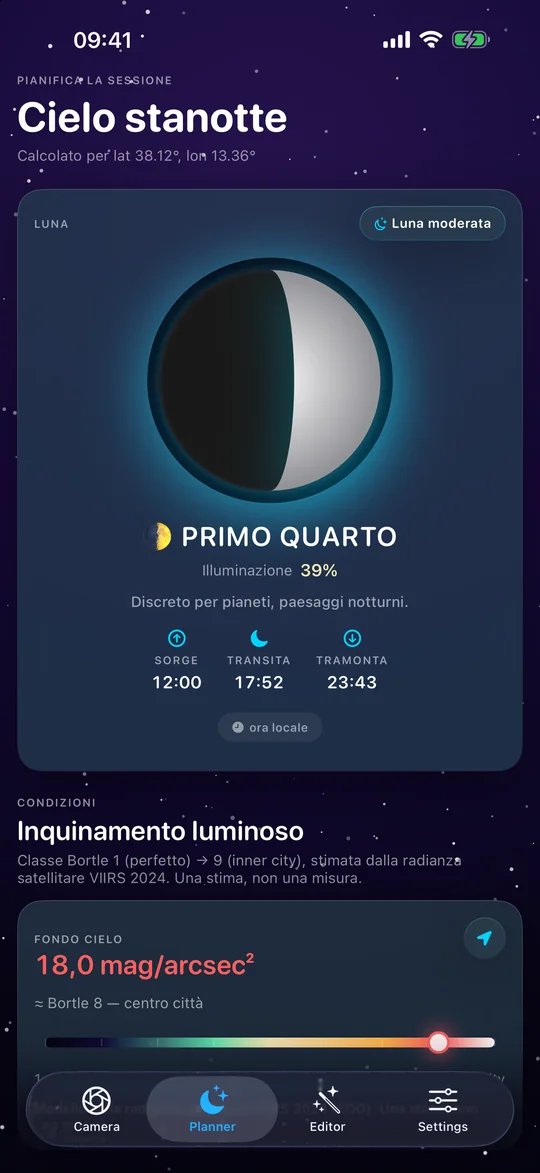
The Deep sky preset puts it plainly: “On a phone you get the core and a halo, not the magazine shot: the sky makes the difference, not the frame count.” It asks for “a genuinely dark sky (Bortle ≤4)” and a tripod. To find out what sky you have at home, the app’s Planner estimates the Bortle class from VIIRS 2024 satellite radiance and says so: “An estimate, not a measurement.” In the screenshot below, calculated for the coordinates of Palermo, the sky background is 18.0 magnitudes per square arcsecond: estimated class 8, inner city.
Why exposures stay short and frames are many
The Earth turns and the sky turns with it: 15 degrees an hour, which is 15 arcseconds every second near the celestial equator and less toward the pole. With a 24 mm equivalent lens and 12 megapixels, one pixel covers about 60 arcseconds, so a star takes four seconds to cross it.
At 3 seconds a star stretches three quarters of a pixel, at 1 second a quarter: they stay dots. At 20 seconds it would be almost five pixels, which means streaks. That is why the sky presets never go past 3 seconds. The 500 rule (500 divided by the equivalent focal length) would give 20 seconds at 24 mm, but it was calibrated for full-frame sensors. On a phone sensor, with much smaller pixels, it is too generous.
Short exposures need many frames, and many frames need time. Each frame also costs about three seconds on top of the exposure, for capture, encoding and writing. That is what field tests measured, and it is why the app says “6-9 minutes” of real session for the 90 exposures of Starry sky, where counting the exposures alone gives four and a half. The 200 one-second exposures of Deep sky, at the same cost, run past twelve minutes.
Deciding in the field
Shoot a 30-frame test, zoom to 100% on a patch of background sky with no stars and look at the grain. If it still bothers you, halving it takes four times as many frames, which is 120. If it is gone, more frames change nothing: the limit is somewhere else, in the sky, the focus or the optics.
On iPhone the manual control offers 30, 40, 50, 75, 100, 150 and 200 frames. The presets already start from a sensible value for their subject.
For the Moon and planets the reasoning changes. The subject is bright and the exposures last thousandths of a second, so noise is not the problem. What you lose is sharpness, because the air is turbulent. You shoot a burst and keep the best.
What the app does with the frames
- Alignment. It finds the brightest stars in each photo (up to 150), works out how far the photo has shifted and rotated relative to a reference photo, and moves it back into place. A photo that doesn’t match is discarded. If there are too few stars in the field, the app stacks without aligning and tells you on screen.
- Starry sky, Deep sky, Illuminated night. Sigma-clip: for each pixel it looks at the value in every frame, discards those that stray from the typical value by more than three standard deviations (satellites, planes, hot pixels) and averages the rest on the sensor’s linear data.
- Moon and planets. It measures each frame’s sharpness and keeps the best 30%: 18 of 60, 15 of 50. It overlays them, averages them and applies an unsharp mask. With at least 12 aligned frames and enough small shifts it can double the resolution (drizzle).
- Star Trails. No alignment, because the stars have to move. At each pixel it keeps the brightest value across all frames, so each star leaves its arc: about 15 degrees an hour. It stops by itself, saving, if the battery drops below 10%, less than 500 MB of storage is left or the phone gets too hot.
- What it saves. On iPhone each session produces an 8-bit JPEG and a 16-bit TIFF. On Android the JPEG is always there and the 16-bit TIFF is an option, off by default.
Mistakes that cost frames
- The phone moves. Wind, a light tripod, a tap on the screen. Alignment corrects small shifts and rotations (up to 3 degrees), not a change of framing.
- The focus is not on the stars. Check it before you start: the app’s focus peaking highlights the edges that are in focus. Then don’t touch the phone.
- Too much light. Streetlights and headlights behind you end up in the background of every frame. To keep your night vision, use the app’s red mode.
- Clouds mid-session. Sigma-clip rejects a satellite’s pixels, not a hazy sky. If clouds roll in, it is better to stop and start over.
- Battery and heat. A long session warms the phone and drains the battery: for star trails, start with a full charge or a power bank.
Questions
Do I need a tracker?
Not for the numbers in this guide. A tracker, or a motorized telescope, allows exposures of tens of seconds without streaks: each frame gathers more light, so you need fewer. It is the next step, not the first.
More frames or longer exposures?
At equal total time, longer exposures win, because the sensor’s read noise is paid on every frame. Without tracking, though, a long exposure stretches the stars. The compromise is the longest exposure that doesn’t stretch them, repeated many times.
Is anything different on Android?
It may. The Android edition is in closed testing on Google Play and is being brought in line with the iPhone one: presets, limits and features may differ and change from one version to the next. The values in this guide are those of the iPhone presets. On Android the stacking method can also be chosen in the advanced settings, among average, median, sigma-clip and maximum, and the 16-bit TIFF is an option, off by default.
What about the Moon?
The Moon has its own rules, explained in the guide on what you can really shoot with a phone.